Iterative Class Discovery Module
The Iterative Class Discovery Module (ICDM) is a new software module for the GENECBR platform. It is a novel sample-based clustering algorithm that discovers groups of patients over a given microarray dataset. It can be used, for example, to find disease subtypes.
The software runs using the GENECBR GSH console, the place where we test our new developments. Please, see the following instructions in order to try this new technique.
GENECBR platform
ICDM runs over the GENECBR platform. You can download it and see the installing instructions in the download section
ICDM required files |
 | Scripts.zip [1.1KB]
script_icdm_HCSalamanca.gsh
script_icdm_Armstrong.gsh
|
This ZIP file contains two GENECBR Shell scripts with 2 example experiments running the new algorithm. Each script uses a different dataset (download the datasets bellow).
After installing GENECBR, decompress the ZIP file in the ./commands folder inside your GENECBR installation directory.
|
 | Datasets.zip [7.8MB]
HCSalamanca.csv
Armstrong.csv
| This ZIP file contains 2 example datasets available for testing ICDM scripts.
Decompress this ZIP file in the ./CASE_BASES folder inside your GENECBR installation directory.
|
Running instructions
- Start GENECBR.
- In the welcome splash screen, select the Expert/Programming Mode.
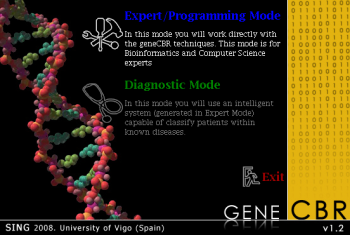
- On the bottom zone, select the GSH Console tab and select Load GSH Script.
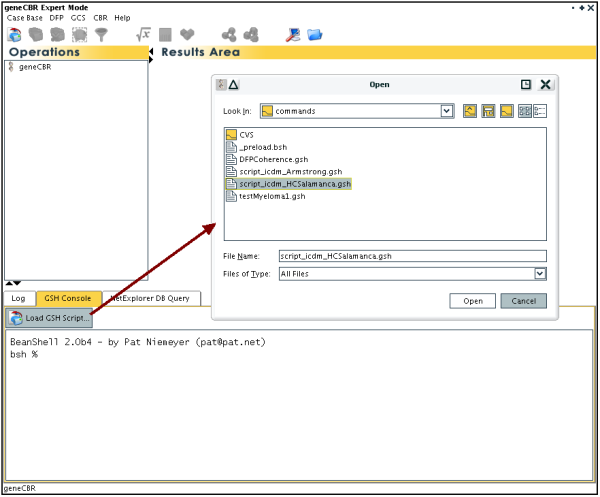
- Navigate to the ./commands folder and select one of the two scripts, i.e.: script_icdm_HCSalamanca.gsh.
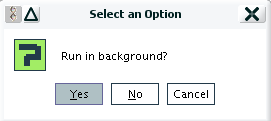
- You will be prompted with the question Run in background?. Say Yes.
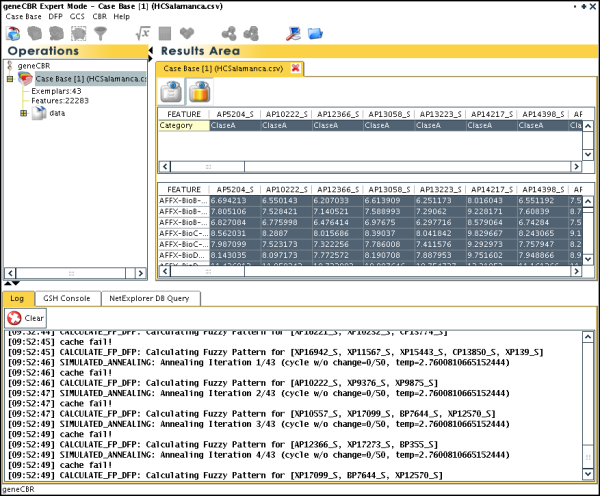
- The algorithm will start. To see its progress and outputs, select the Log tab.
|